
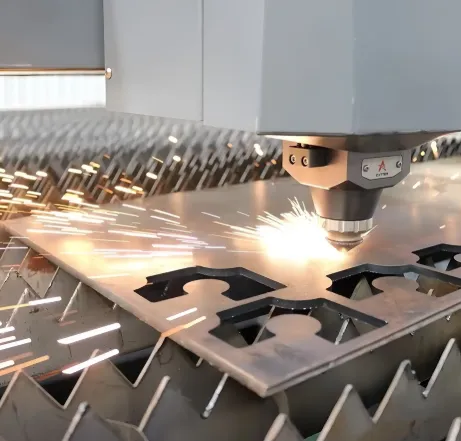
2D and 3D laser cutting describe two related but distinct ways of using a focused laser beam to cut metal, and the difference between them has real consequences for part design, cost, and what geometries are achievable. Flat-sheet cutting works in two dimensions on stock lying on a bed, while three-dimensional cutting moves the beam across contoured surfaces, tubes, and already-formed parts. For engineers, designers, and procurement specialists, knowing which approach fits a given part is the key to specifying it correctly and avoiding unnecessary cost. This guide explains how the two differ, where each excels, and how to choose between them.
The focus here is on the practical distinction rather than the underlying physics of the laser itself. The goal is balanced, useful guidance for technically minded readers deciding how a part should be cut.
What Distinguishes 2D From 3D Laser Cutting
The core difference lies in how many axes the beam moves through and the geometry of the workpiece. In 2D laser cutting, the material is a flat sheet, and the cutting head moves across two axes to follow a programmed outline, with the beam essentially perpendicular to the surface. It is fast, precise, and by far the most common form of laser cutting for sheet metal.
In 3D laser cutting, the cutting head moves through additional axes, typically five, so the beam can reach surfaces at varying angles and follow contours that are not flat. This allows cutting of formed parts, tubes, and profiles, and the trimming of features such as holes and edges on components that have already been shaped. The added freedom comes with greater complexity and cost, which is why 3D cutting is reserved for the work that genuinely needs it.
How 2D Laser Cutting Works and Where It Fits
Two-dimensional cutting is the workhorse of sheet metal fabrication. A flat sheet sits on the bed, and the head traces each part outline, melting or vaporizing the metal while an assist gas clears the cut. Because the beam follows a programmed path with no part-specific tooling, the same machine can cut almost any flat profile without changeover.
This makes 2D cutting ideal for flat parts, blanks that will later be formed, brackets, panels, and any high-mix work where designs vary frequently. Its strengths are speed, precision, and the absence of tooling lead time, which suits prototypes and low-to-medium volumes especially well. The limitation is in the name: it produces flat parts. Any three-dimensional shape must be created by a separate forming step after cutting, and any feature on an already-formed part is beyond its reach.
How 3D Laser Cutting Works and Where It Fits
Three-dimensional cutting extends the laser’s reach to contoured and formed geometry. With a multi-axis head, often robot-mounted or on a gantry, the beam can approach a surface from many angles, cutting holes, slots, and trimmed edges into parts that are no longer flat. Tube and profile cutting is a common variant, where round or square section stock is rotated and cut to produce mitred ends, holes, and intersections.
This capability matters most in two situations. The first is finishing formed parts: trimming excess material or piercing holes in a stamped or hydroformed component, where the features sit on curved or angled surfaces that flat cutting cannot address. The second is tube and profile work for frames and structures. In the automotive field, 3D cutting is frequently used to trim and pierce formed body and chassis components after pressing, where the geometry is inherently three-dimensional. Readers looking at how flat and contour cutting integrate with forming in practice can consult a reference on 2D and 3D laser cutting within an integrated production environment.
Comparing the Two Approaches
Neither approach is universally better; they solve different problems. The table-like comparison below frames the main trade-offs.
- Geometry: 2D handles flat profiles only; 3D handles contours, formed parts, tubes, and profiles.
- Speed and cost: 2D is generally faster and cheaper per part for flat work; 3D carries higher equipment complexity and cost.
- Typical use: 2D suits blanks, panels, and flat brackets; 3D suits trimming formed parts and cutting tubular structures.
- Setup: 2D needs minimal fixturing on a flat bed; 3D often needs part-specific fixtures to hold contoured parts precisely.
- Precision context: both are precise, but 3D accuracy depends heavily on how well the formed part is located and held.
A useful way to think about it: if the part is flat, or can be cut flat and then formed, 2D cutting is almost always the right and cheaper choice. 3D cutting earns its place only when features must be cut into geometry that is already three-dimensional, or when tube and profile work is involved.
How to Choose Between 2D and 3D Cutting
Choosing the right approach is mostly a matter of working through the part’s geometry and process sequence. A few questions guide the decision:
- Is the part flat or formed? Flat parts and blanks point straight to 2D cutting.
- Do features sit on a contoured surface? Holes or trimmed edges on an already-formed part generally require 3D cutting.
- Is it a tube or profile? Cutting and piercing tubular or sectioned stock is a classic 3D application.
- Can the feature be cut before forming instead? Sometimes a hole can be cut flat and the part formed afterward, avoiding 3D cutting, though forming may distort a pre-cut feature, so this needs checking.
- What is the volume? At very high volumes, dedicated trimming tooling may outcompete 3D laser cutting, just as stamping can outcompete 2D cutting for flat blanks.
The fourth point deserves emphasis. The decision to cut a feature before or after forming is a genuine engineering trade-off. Cutting flat is cheaper, but forming can distort holes placed too near a bend, so features in those locations are often better cut after forming with a 3D process. Weighing this early, during design, avoids costly rework.
Cost, Quality, and Practical Considerations
The cost logic mirrors the geometry. Because 2D cutting is fast and needs minimal fixturing, its per-part cost is lower for flat work, driven mainly by machine time and material. 3D cutting carries higher cost from more complex equipment, slower multi-axis motion, and the part-specific fixturing needed to hold contoured parts accurately. That fixturing is also a quality factor: 3D cut accuracy depends on locating the formed part consistently, so a part that varies from the forming process can introduce variation into the cut.
Edge quality in both cases depends on the familiar laser parameters of power, speed, assist gas, and focus, matched to the material and thickness. The added variable in 3D cutting is maintaining the correct beam-to-surface relationship as the head moves through angles, which places more demand on programming and machine calibration.
Complementary Tools for Different Jobs
2D and 3D laser cutting are complementary rather than competing technologies, each suited to a different class of part. Flat cutting is the efficient default for sheets, blanks, and panels, while three-dimensional cutting unlocks the trimming of formed parts and the cutting of tubes and profiles that flat processing cannot reach. The right choice follows from the part’s geometry, its process sequence, and its volume, with the timing of cutting relative to forming often being the decisive design question. Engineers and buyers who match the cutting method to the part rather than to habit get accurate results at sensible cost, and avoid the distortion and rework that come from forcing a flat process onto a three-dimensional problem.
Frequently Asked Questions
When is 3D laser cutting actually necessary?
It is necessary when features such as holes or trimmed edges must be cut into a surface that is already contoured or formed, or when cutting tubes and profiles. If a part is flat, or can be cut flat and then formed, 2D cutting is almost always the better and cheaper option.
Is it better to cut holes before or after forming?
It depends on where the feature sits. Cutting flat before forming is cheaper, but forming can distort holes placed near a bend or on a curved area. Features in those locations are often better cut after forming with a 3D process. This trade-off is best resolved during design.
Why does 3D laser cutting cost more than 2D?
3D cutting uses more complex multi-axis equipment, moves more slowly through contoured paths, and usually requires part-specific fixtures to hold formed parts precisely. These factors raise both setup and per-part cost compared with cutting flat sheet on a simple bed.
Does 3D cutting accuracy depend on the forming process?
Yes. Because 3D cutting works on already-formed parts, the cut’s accuracy depends on how consistently each part is shaped and located in its fixture. Variation from the forming step can carry into the cut, so stable forming and good fixturing are both important for precise results.